Understanding the Node.js Module System: CommonJS and ES Modules
Notes from Chapter 2 of the Node.js Design Patterns Book.
I’m currently reading Node.js Design Patterns. In this post, I’m collecting my notes on Chapter 2, which explains how the Node.js module system works.
The chapter covers quite a lot, but I want to focus on the parts I think are useful to understand early on: why modules exist, how CommonJS loads and caches them, what happens with circular dependencies, and how ES Modules handle imports differently.
I'll start with CommonJS, then move to ES Modules and their loading process.
1. Why do we need modules?
As applications grow, keeping all the code in one file becomes difficult to manage. Modules let us divide a codebase into smaller units, each responsible for a particular part of the application.
According to the book, a module system addresses four main needs.
Splitting the codebase. We can put related functionality in separate files. For example, a project might have server.js for starting the server, db.js for database operations, and utils.js for shared helper functions. Each part can be developed and tested separately.
Code reuse. A module can implement functionality that is useful in more than one place. Instead of rewriting a date-formatting function in every project, we can package it into a module and reuse it.
Encapsulation. A module can expose a small public interface while keeping its implementation details private. A database module might export a findUser() function without exposing every internal step involved in querying the database.
Dependency management. Modules can depend on other modules, including third-party packages. A package may also require other packages to work, so the module system and package manager need to account for these dependencies.
These needs explain why Node.js provides a module system. The next question is how one module makes its functionality available to another.
2. CommonJS: require() and module.exports
CommonJS is the original module system used by Node.js. Its two main features are require() for loading modules and module.exports for defining what a module exposes.
Consider these two files:
// greet.cjs
module.exports = (name) => `Hello, ${name}!`
// app.cjs
const greet = require('./greet.cjs')
console.log(greet('Node'))
The output is:
Hello, Node!
When app.cjs calls require('./greet.cjs'), Node loads the file and returns its exported value. In this case, the exported value is a function, which we assign to greet and call.
You may also encounter exports in CommonJS modules. Initially, exports references the same object as module.exports, so adding a property through either reference works. However, assigning a new value to exports alone does not replace module.exports.
For now, the important point is that require() returns the value assigned to module.exports.
3. The CommonJS module cache
What happens if several parts of an application require the same module?
Node doesn't execute that module from scratch every time. After the first load, it caches the module. Subsequent calls to require() that resolve to the same module return its cached exports.
Let's look at an example.
// counter.cjs
console.log('counter module loaded')
module.exports = { count: 0 }
// app.cjs
const first = require('./counter.cjs')
const second = require('./counter.cjs')
first.count++
console.log(second.count)
console.log(first === second)
Output:
counter module loaded
1
true
The message appears only once, even though we called require() twice. Both variables refer to the same exported object, which is why changing first.count also changes the value observed through second.
Remember this behavior when a module exports an object or a class instance. Different parts of an application can receive the same instance through the module cache.
There is a detail here: Node caches the module, not a fresh copy of its exports for each caller. That distinction also helps explain what happens when modules depend on each other in a circle.
4. Circular dependencies in CommonJS
A circular dependency occurs when modules depend on each other, directly or indirectly.
For example:\
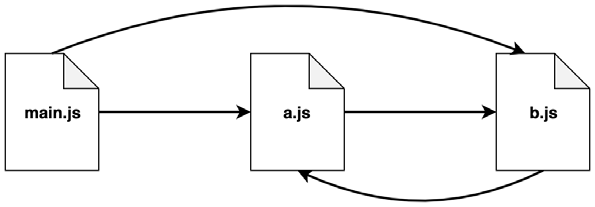
Here, main.js requires both modules, while a.js and b.js also require each other. It's obvious that we have a circular dependency here as module a.js requires module b.js and module b.js requires module a.js.\
Let's have a look at the code of these two modules:
// a.js
exports.loaded = false
const b = require('./b')
module.exports = {
b,
loaded: true // overrides the previous export
}
// b.js
exports.loaded = false
const a = require('./a')
module.exports = {
a,
loaded: true
}
And here is the main.js file:
const a = require('./a')
const b = require('./b')
console.log('a ->', JSON.stringify(a, null, 2))
console.log('b ->', JSON.stringify(b, null, 2))
Output:
a -> {
"b": {
"a": {
"loaded": false
},
"loaded": true
},
"loaded": true
}
b -> {
"a": {
"loaded": false
},
"loaded": true
}Here's what happens:
This result reveals the caveats of circular dependencies with CommonJS, that is, different parts of our application will have a different view of what is exported by module a.js and module b.js, depending on the order in which those dependencies are loaded. While both the modules are completely initialized as soon as they are required from the module main.js, the a.js module will be incomplete when it is loaded from b.js. In particular, its state will be the one that it reached the moment b.js was required.
The order in which modules load and assign their exports matters. That's particularly important when one module needs another module's values during initialization.
5. ES Modules: static imports
ES Modules (ESM) are JavaScript's standardized module system. They use import and export instead of CommonJS's require() and module.exports.
The most important difference discussed in the book is that static ESM imports describe dependencies at the top level of a module. This allows them to be analyzed before module evaluation.
For example, this isn't valid ESM syntax:
if (condition) {
  import first from './first.mjs'
} else {
  import second from './second.mjs'
}
Static import declarations cannot be placed inside an if statement or a loop, and their module specifiers must be written as string literals.
The equivalent conditional loading is valid in CommonJS:
let selected

if (condition) {
  selected = require('./first.cjs')
} else {
  selected = require('./second.cjs')
}
At first, the ESM restriction might seem unnecessary. Why shouldn't we be allowed to choose a dependency inside an if statement?
The reason is that static imports allow the module system to identify dependencies before evaluating the module's ordinary code. It can analyze the dependency graph without first executing each conditional branch.
This structure also makes static analysis easier for tools that perform optimizations such as tree shaking, where unused exports can be removed from a bundled application when the tool can determine they're unnecessary. This doesn't mean Node automatically removes unused code in every application; it means the structure of ESM imports makes such analysis possible.
But sometimes a program really does need to choose a module at runtime. ES Modules provide another form of import for that situation.
6. Dynamic imports with import()
Imagine an application that needs to load translation messages according to the current user's language. The language might only be known at runtime.
A static import can't build its module path from a variable, but the dynamic import() expression can:
const language = 'fr'
const { default: messages } =
  await import(`./i18n/${language}.mjs`)

console.log(messages.welcome)
Suppose ./i18n/fr.mjs exports an object as its default export:
export default { welcome: 'Bonjour' }
The output is:
Bonjour
Unlike the static import declaration, import() accepts a computed module specifier and returns a Promise. Once that Promise resolves, the returned module namespace object provides access to the imported module's exports.
Dynamic imports can be used inside conditions and functions, and they're available in both CommonJS and ESM files. In an ESM file, top-level await can be used as shown above.
The distinction is straightforward: static imports declare dependencies ahead of evaluation, while dynamic imports allow a program to request a module when it needs it.
7. How ES Modules are loaded
The book goes further than the import syntax and explains how ESM modules are loaded. This is also where the difference in circular-dependency behavior becomes clearer.
When Node starts executing a file, that file is the entry point. From there, the module system follows imports recursively to discover the other modules the application needs. The resulting structure is called the dependency graph.
The book describes this process in three phases.
Phase 1: Construction (or parsing)
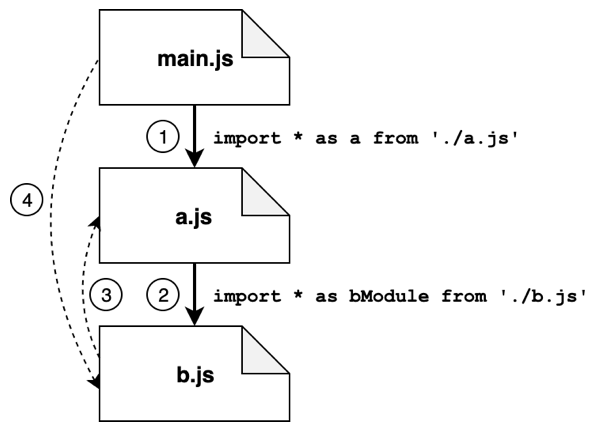
The diagram shows how the module system starts from main.js and follows its imports. The first import leads to a.js, and an import inside a.js leads to b.js. The example also has b.js importing a.js, creating a cycle.
Since a.js has already been visited, the interpreter doesn't explore it again as a new module. It returns to a.js, then to main.js, where it can continue following any remaining imports. When it encounters a module it has already visited, it doesn't repeat the exploration.
The point of this phase is to discover the dependency graph and load the required module source code. The normal module bodies have not been evaluated yet.
Phase 2: Instantiation and linking
Identifying the exports
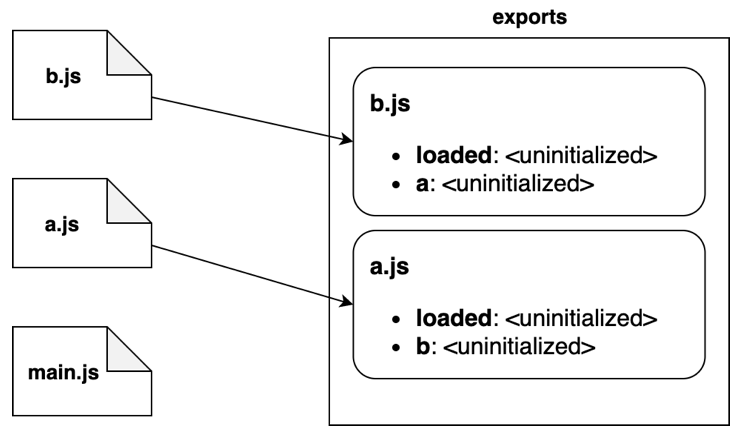
The interpreter follows the dependency structure from the previous phase, moving from the dependencies toward the entry point. In the example, it starts with b.js, then moves to a.js, and finally to main.js.
For each module, the interpreter identifies its exported names. For example, b.js exports loaded and a, while a.js exports loaded and b.
At this stage, the interpreter has established which names each module exports, but the associated values have not been initialized yet. The diagram represents the export names being recorded, not the modules' fully evaluated state.
Connecting imports to exports
After identifying the exported names, the interpreter connects imports to the exports they refer to.
As the diagram shows, b.js links to the exports provided by a.js, and a.js links to the exports provided by b.js. The entry point,main.js, also connects its imports to the appropriate exports.
This can be done even though a.js and b.js import one another. The module system establishes these relationships without needing to execute the module bodies first.
The values are still uninitialized at this stage. What has been established is which exported binding each import refers to.
Phase 3: Evaluation
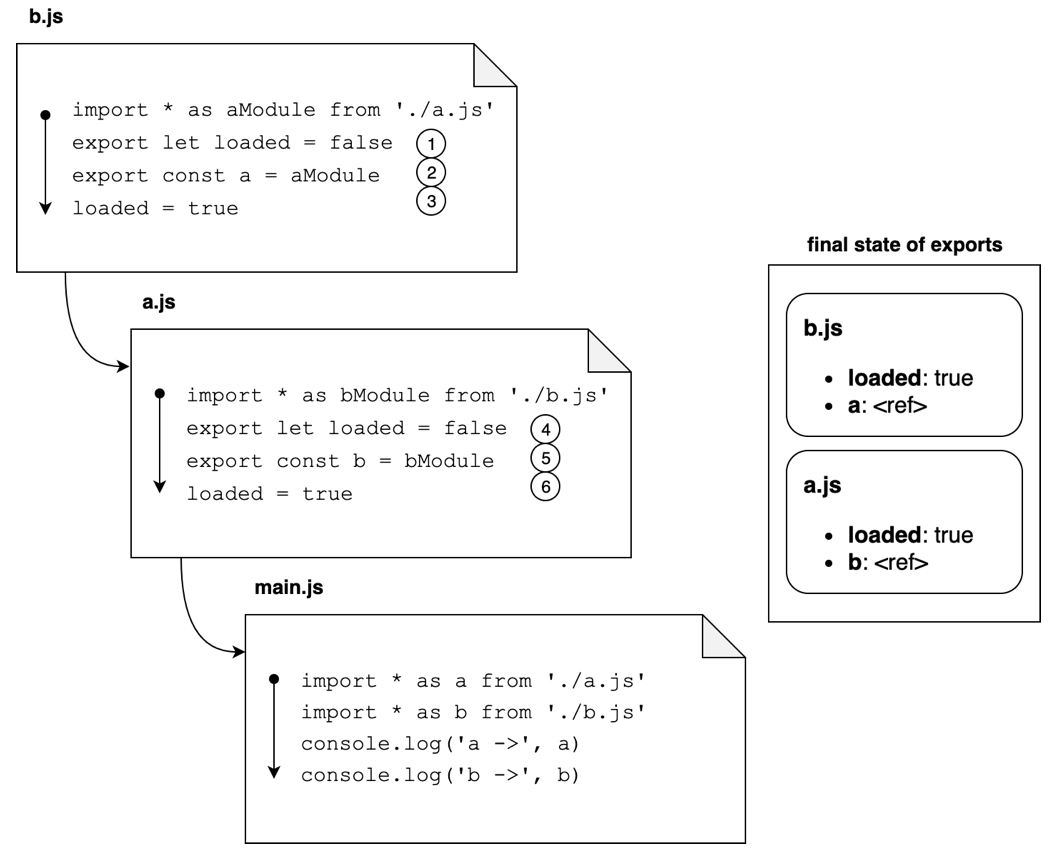
The final phase is where the module bodies execute. Following the order shown in the diagram, evaluation begins with b.js, continues with a.js, and finishes with main.js.
In the book's example, b.js first initializes its loaded export to false. It then initializes a with a reference to the module represented by a.js, and eventually changes loaded to true. Once b.js finishes, the interpreter evaluates a.js in a similar way, before moving to main.js.
By the time main.js executes, its dependencies have been evaluated according to this order.
Together, the diagrams show the different parts of the same process: discovering the modules and their dependencies, identifying and connecting exports, and finally executing the module bodies.
This distinction matters when looking at circular dependencies. ESM can connect imports and exports before evaluation, but that doesn't guarantee every exported value is initialized whenever another module tries to read it. To understand that caveat, we need to look at live bindings.
8. Read-only live bindings
Consider a module that exports a score and a function for incrementing it.
// score.mjs
export let score = 0

export function addPoint() {
  score++
}
Another module imports them:
// main.mjs
import { score, addPoint } from './score.mjs'

console.log(score) // 0
addPoint()
console.log(score) // 1
The second log prints 1, even though main.mjs never assigns a new value to score.
This is because an ESM import is a live binding. It refers to the binding in the module that exports it, rather than receiving an independent copy of its current value. When the exporting module changes that binding, the importer sees the updated value when it reads the binding.
The import is also read-only from the importing module. Trying to assign a value to score directly in main.mjs is invalid:
score = 10 // Invalid assignment to an imported binding
The exporting module controls its own binding. The importing module can read the value and call exported functions, but it cannot reassign the imported binding.
How is this different from CommonJS?
Consider a similar CommonJS module:
// score.cjs
let score = 0
module.exports = {
  score,
  addPoint() { score++ }
}
And its consumer:
// main.cjs
const m = require('./score.cjs')
m.addPoint()
console.log(m.score) // 0
Why does this print 0?
When the object is created, its score property receives the current numeric value of the local variable. Later, addPoint() increments the local variable, but it doesn't update the object's score property.
This isn't a general rule that CommonJS exports can never reflect changes. The example exports an object containing a primitive value, and that particular property isn't updated later. A module could instead update the exported property or expose a getter.
The key difference is that ESM imports are bindings to exported variables, while CommonJS consumers receive the value of module.exports. What they observe afterward depends on the value exported and how it is updated.
9. Circular dependencies in ES Modules
Let's return to the circular dependency between a.mjs and b.mjs.
With CommonJS, a module can receive the current exports of another module while that module is still executing. With ESM, the system first establishes the import/export connections and then evaluates the modules according to the dependency graph.
That means the circular relationship can be linked before either module's ordinary code runs.
However, linking a cycle doesn't guarantee that every value is ready when the code tries to read it. If a module accesses a let or const export before that binding has been initialized, the read can throw a ReferenceError.
This is why it's misleading to say that ESM makes circular dependencies completely safe. It handles the connections differently from CommonJS, but the order of evaluation and initialization still matters.
The three loading phases and live bindings explain both sides of this behavior: imports can be connected before evaluation, yet a binding can remain uninitialized until its module reaches the relevant declaration during evaluation.
10. CommonJS vs. ES Modules
Here's a summary of the differences covered in this chapter.
| Topic | CommonJS | ES Modules |
|---|---|---|
| Import syntax | require() can be called conditionally |
Static import is top-level; import() is dynamic |
| Dependency discovery | Can depend on executing code | Static imports can be analyzed before evaluation |
| Module cache and evaluation | A module is executed when first loaded and cached for later require() calls |
Modules go through construction, linking, and evaluation |
| Export behavior | require() returns the value of module.exports |
Imports are read-only live bindings |
| Circular dependencies | Can expose partially initialized exports | Cycles can be linked, but early reads may fail |
| Runtime module selection | require() can use conditional logic |
Dynamic import() supports runtime selection and returns a Promise |
Neither system should be understood only in terms of different syntax. They also differ in how dependencies are discovered, how imports relate to exports, and when code executes.
What I took from this chapter
The points I found most important to understand are:
- Modules separate functionality, expose public interfaces, and allow code to be reused.
- CommonJS caches loaded modules, and circular dependencies can expose partially initialized exports.
- ESM static imports allow the dependency graph to be established before module evaluation.
- Dynamic
import()handles cases where a module needs to be selected at runtime. - ESM live bindings and its loading phases explain how circular imports can be connected, along with the initialization problems that can still occur.
These concepts provide a useful starting point for reading Node.js code and understanding how a project is organized.
Comments
Join the discussionNo comments yet. Be the first to comment.
